Ako sa zaregistrujem do služby KidLogger.net?
Zaregistroval som sa. Aký je ďalší krok?
Ako si prezerať denníky aktivít a správy na KidLogger.net?
Ako monitorovať viacero zariadení pomocou jedného účtu?
Ako nastaviť a odosielať e-mailové správy?
Ako stiahnuť záložnú kópiu nahraných údajov?
Ako posielať e-mailové reporty?
- Používatelia Standard a Professional môžu dostávať e-mailové reporty pre každé zariadenie. Standard účty umožňujú 1 report denne, Professional až 5 reportov.
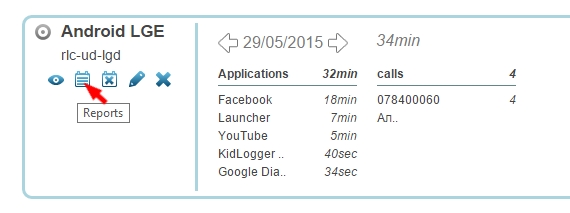
- Prihláste sa na KidLogger.net a kliknite na ikonu Reports pri názve zariadenia.
- V ďalšom okne vyberte údaje, e-mailovú adresu a čas doručenia. Zaškrtnite is Active a kliknite na Add Report.
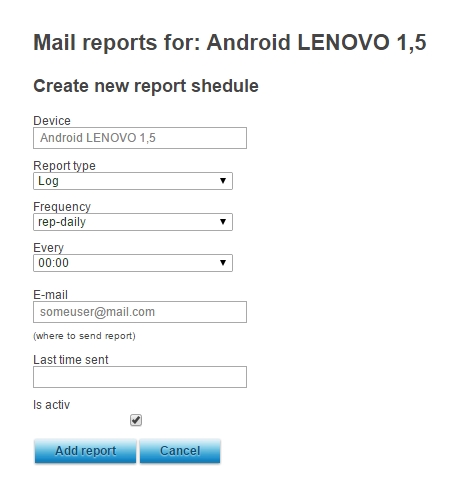
- Môžete nastaviť rôzne časy a adresy pre každé zo svojich zariadení.
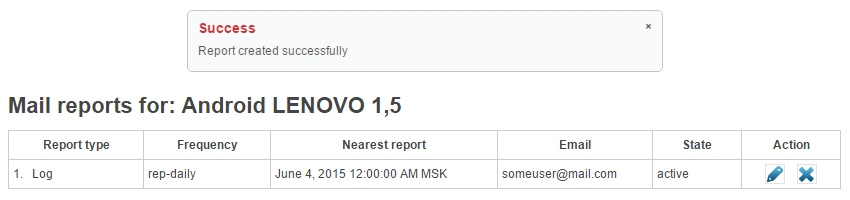
- V nasledujúcom okne uvidíte históriu odosielania a môžete existujúce reporty upraviť alebo zmazať.