Comment s'inscrire au service KidLogger.net ?
Je me suis inscrit. Quelle est la prochaine étape ?
Comment consulter les journaux d'activité et les rapports sur KidLogger.net ?
Comment surveiller plusieurs appareils avec un seul compte ?
Comment configurer et envoyer des rapports par e-mail ?
Comment télécharger une copie de sauvegarde des données téléchargées ?
Comment renouveler ou prolonger mon compte ?
Comment envoyer des rapports par e-mail ?
- Les utilisateurs Standard et Professional peuvent recevoir des rapports par e-mail pour chaque appareil. Les utilisateurs Standard peuvent envoyer 1 rapport par jour et par appareil, contre 5 pour les comptes Professional.
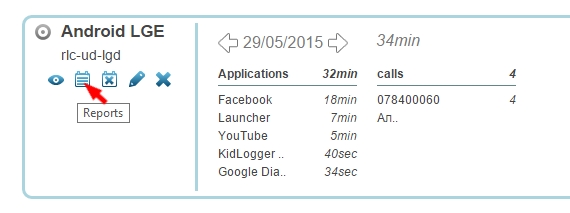
- Pour configurer cela, connectez-vous à KidLogger.net et cliquez sur l'icône Reports à côté du nom de l'appareil.
- Dans la fenêtre suivante, précisez les données souhaitées, votre e-mail et l'heure d'envoi. Cochez is Active et cliquez sur Add Report.
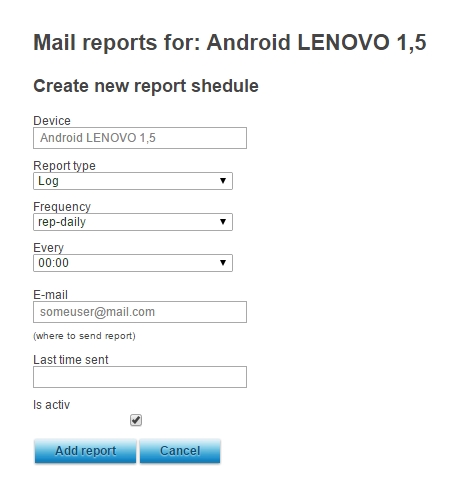
- Vous pouvez programmer des envois à des heures et des adresses différentes selon l'appareil.
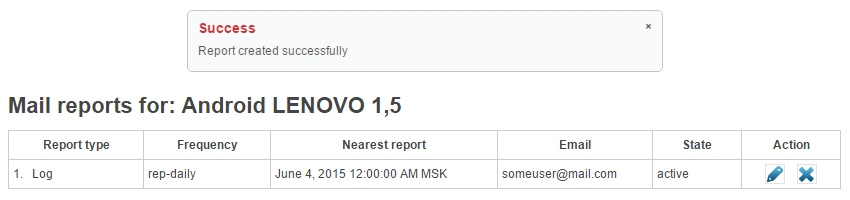
- La fenêtre suivante affiche l'état du dernier rapport envoyé et vous permet de modifier ou supprimer vos programmations.