Hur registrerar jag mig på KidLogger.net-tjänsten?
Jag har registrerat mig. Vad är nästa steg?
Hur granskar jag aktivitetsloggar och rapporter på KidLogger.net?
Hur övervakar jag flera enheter med ett enda konto?
Hur ställer jag in och skickar e-postrapporter?
Hur laddar jag ner en säkerhetskopia av uppladdade data?
Hur betalar jag för en prenumeration?
Hur skickar man e-postrapporter?
- Standard- och Professional-användare kan få rapporter via e-post för varje enhet. Standard-konton tillåter 1 rapport per dag, Professional upp till 5 rapporter.
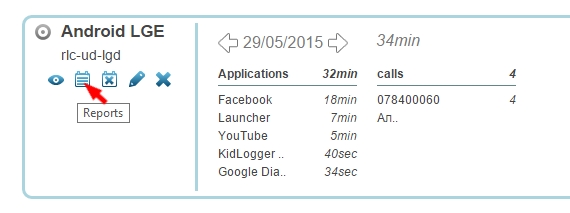
- Logga in på KidLogger.net och klicka på ikonen Reports bredvid enhetens namn.
- Välj önskad data, din e-postadress och leveranstid. Markera is Active och klicka på Add Report.
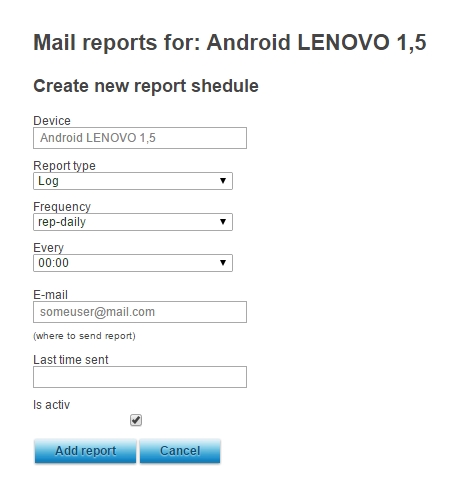
- Du kan skicka rapporter till olika adresser och tider beroende på enhet.
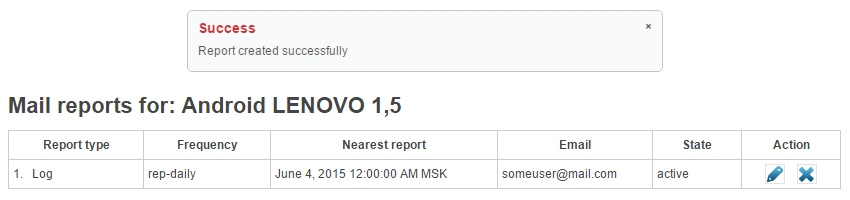
- I nästa fönster ser du när senaste rapporten skickades och kan redigera eller ta bort scheman.