मैं KidLogger.net सेवा पर पंजीकरण कैसे करूं?
मैंने पंजीकरण कर लिया है। अगला कदम क्या है?
KidLogger.net पर गतिविधि लॉग और रिपोर्ट की समीक्षा कैसे करें?
एक ही खाते का उपयोग करके कई उपकरणों की निगरानी कैसे करें?
ईमेल रिपोर्ट कैसे सेट करें और भेजें?
अपलोड किए गए डेटा की बैकअप प्रति कैसे डाउनलोड करें?
सदस्यता के लिए भुगतान कैसे करें?
ई-मेल रिपोर्ट कैसे भेजें?
- Standard और Professional खाता धारक प्रत्येक डिवाइस के लिए ईमेल रिपोर्ट प्राप्त कर सकते हैं। Standard उपयोगकर्ता प्रतिदिन 1 रिपोर्ट और Professional उपयोगकर्ता 5 रिपोर्ट तक भेज सकते हैं।
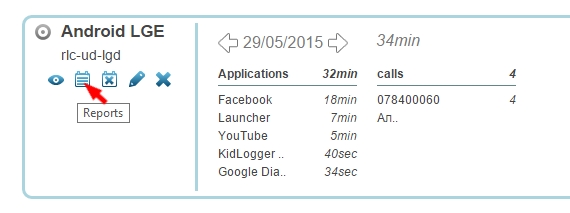
- KidLogger.net पर लॉगिन करें और डिवाइस के नाम के पास Reports आइकन पर क्लिक करें।
- अगली विंडो में डेटा का प्रकार, अपना ईमेल और समय चुनें। is Active को चेक करें और Add Report पर क्लिक करें।
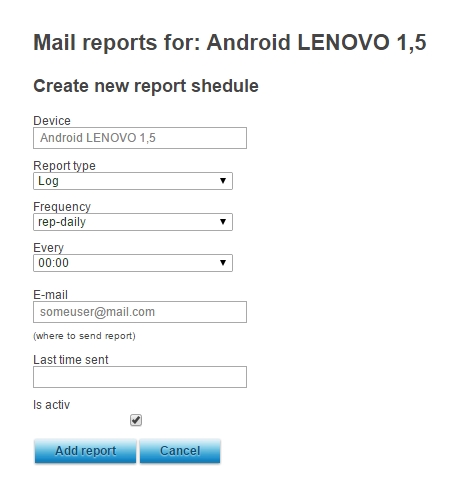
- आप अलग-अलग डिवाइस के लिए अलग-अलग समय और पते पर रिपोर्ट सेट कर सकते हैं।
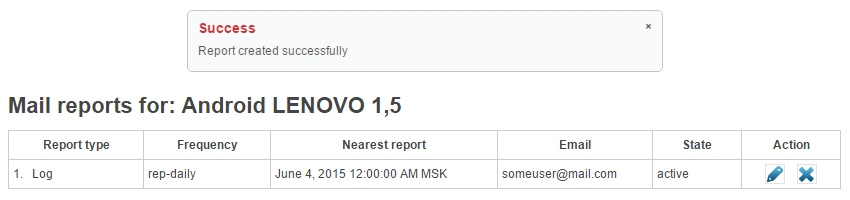
- अगली विंडो में आप देख सकते हैं कि आखिरी रिपोर्ट कब भेजी गई थी, और आप इसे एडिट या डिलीट भी कर सकते हैं।