¿Cómo me registro en el servicio KidLogger.net?
Me he registrado. ¿Cuál es el siguiente paso?
¿Cómo revisar los registros de actividad y los informes en KidLogger.net?
¿Cómo monitorear varios dispositivos con una sola cuenta?
¿Cómo configurar y enviar informes por correo electrónico?
¿Cómo descargar una copia de seguridad de los datos cargados?
¿Cómo enviar informes por correo electrónico?
- Los usuarios Standard y Professional pueden recibir informes por email de cada dispositivo. Los usuarios Standard pueden enviar un informe al día por dispositivo, y los Professional hasta 5 informes.
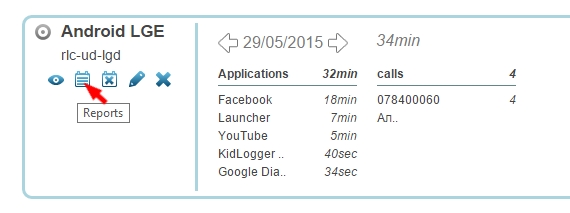
- Inicie sesión en KidLogger.net y haga clic en el icono Reports junto al nombre del dispositivo.
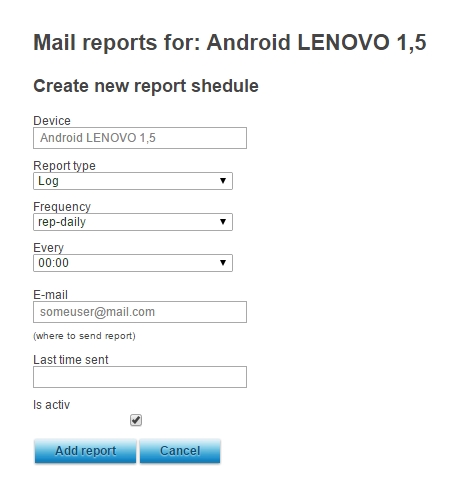
- En la siguiente ventana, elija los datos, su dirección de correo y la hora de entrega. Marque is Active y pulse Add Report.
- Puede configurar envíos en distintos horarios y a diferentes correos para cada dispositivo.
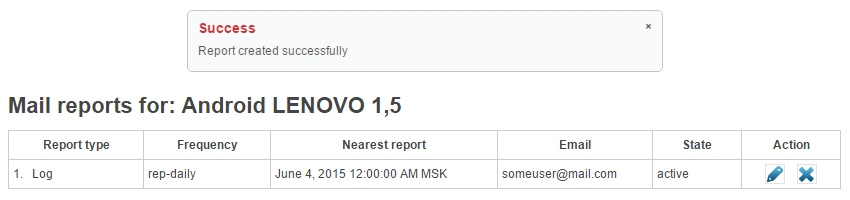
- En la ventana siguiente podrá ver el último informe enviado, sus detalles y editar o eliminar la configuración.