Wie registriere ich mich beim KidLogger.net-Service?
Ich habe mich registriert. Was ist der nächste Schritt?
Wie kann ich Benutzeraktivitätsprotokolle und Berichte auf KidLogger.net einsehen?
Wie überwache ich mehrere Geräte mit einem einzigen Konto?
Wie richte ich E-Mail-Berichte ein und versende sie?
Wie lade ich eine Sicherungskopie der hochgeladenen Daten herunter?
Wie bezahle ich für ein Abonnement?
Wie richte ich E-Mail-Berichte ein?
- Nutzer von Standard- und Professional-Konten können Berichte für jedes verbundene Gerät per E-Mail erhalten. Standard-Nutzer können einen Bericht pro Gerät und Tag senden, Professional-Nutzer bis zu 5 Berichte.
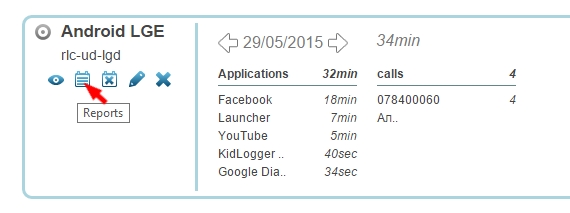
- Loggen Sie sich bei KidLogger.net ein und klicken Sie auf das Reports-Symbol neben dem Gerätenamen.
- Geben Sie im nächsten Fenster an, welche Daten Sie erhalten möchten, Ihre E-Mail-Adresse und die Lieferzeit. Aktivieren Sie die Option is Active und klicken Sie auf Add Report.
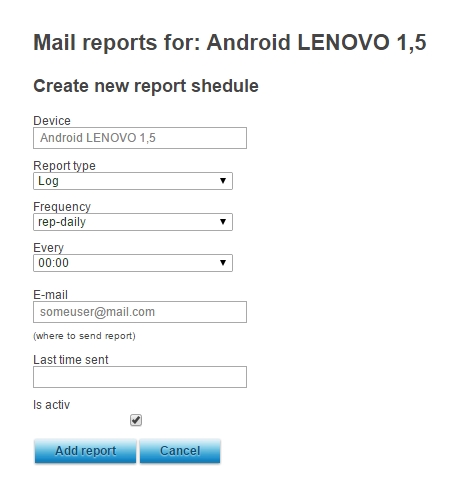
- Sie können Berichte von verschiedenen Geräten zu unterschiedlichen Zeiten an verschiedene Adressen senden.
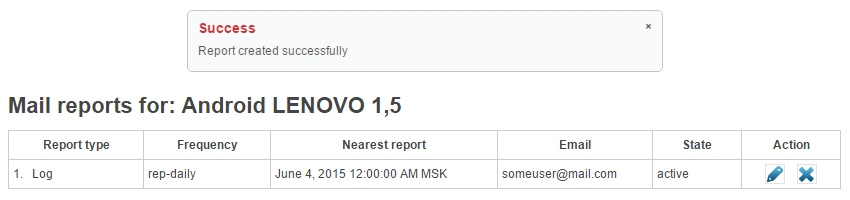
- Im nächsten Fenster sehen Sie, wann der letzte Bericht gesendet wurde, sowie Details dazu, und können diese bearbeiten oder löschen.