Como me registro no serviço KidLogger.net?
Eu me registrei. Qual é o próximo passo?
Como revisar os registros de atividade e relatórios no KidLogger.net?
Como monitorar vários dispositivos usando uma única conta?
Como configurar e enviar relatórios por e-mail?
Como baixar uma cópia de backup dos dados enviados?
Como pagar por uma assinatura?
Como enviar relatórios por e-mail?
- Utilizadores Standard e Professional podem receber relatórios por e-mail de cada dispositivo. Utilizadores Standard podem enviar 1 relatório diário por dispositivo, enquanto contas Professional podem enviar até 5.
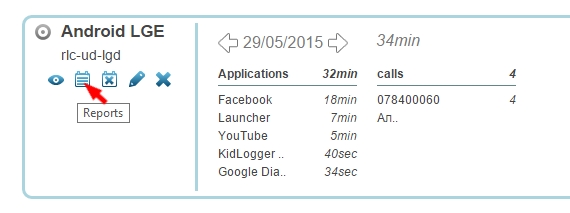
- Inicie sessão no KidLogger.net e clique no ícone Reports junto ao nome do dispositivo.
- Na janela seguinte, escolha os dados pretendidos, o seu e-mail e a hora de entrega. Marque is Active e clique em Add Report.
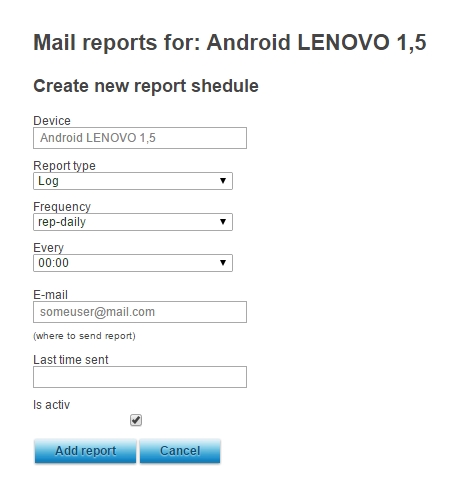
- Pode configurar envios para diferentes horários e endereços dependendo do dispositivo.
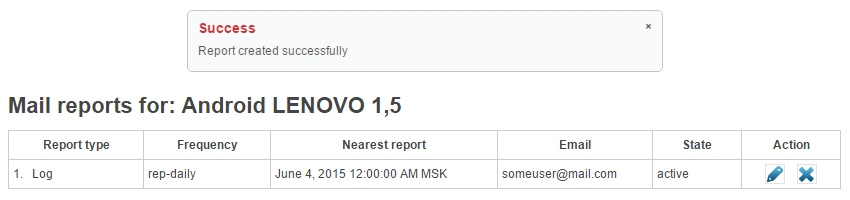
- Na janela seguinte, pode consultar o estado do último envio e editar ou remover os agendamentos.