How do I register with the KidLogger.net service?
I have registered. What is the next step?
How to review user activity logs and reports on KidLogger.net?
How to monitor multiple devices using a single account?
How to set up and send email reports?
How to download a backup copy of uploaded data?
How to pay for a subscription?
How to send e-mail reports?
- Standard and Professional account users can receive reports via email for each connected device. Standard users can send one report per device daily, while Professional users can send up to 5 reports.
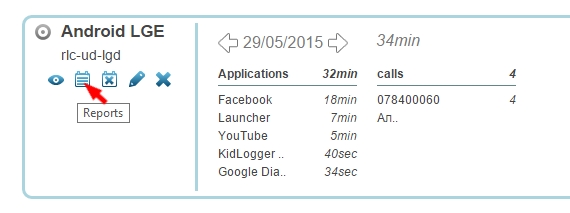
- To configure this, log in to KidLogger.net and click the Reports icon next to the device name.
- In the settings window, specify the data types, your email address, and the delivery time. Check the is Active box and click Add Report.
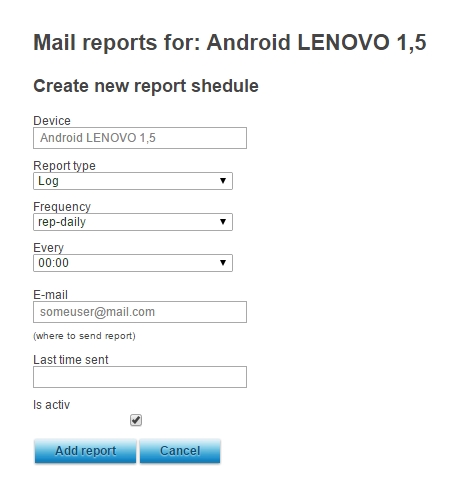
- You can set different delivery times, recipients, and types of information for each of your devices.
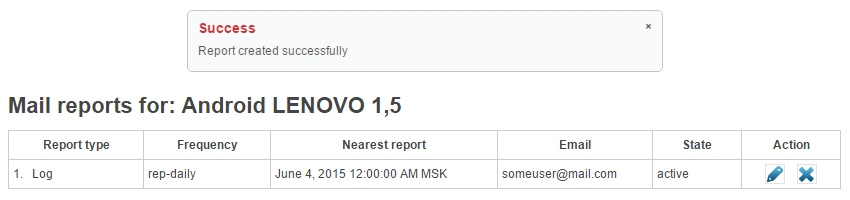
- In the next window, you can track when the last report was sent, view details, and edit or remove existing schedules.