כיצד אני נרשם לשירות KidLogger.net?
כיצד ניתן לעבור על יומני פעילות ודוחות ב-KidLogger.net?
כיצד ניתן לנטר מספר מכשירים באמצעות חשבון אחד?
כיצד להגדיר ולשלוח דוחות אימייל?
כיצד להוריד עותק גיבוי של הנתונים שהועלו?
כיצד לשלוח דוחות בדוא"ל?
- משתמשי Standard ו-Professional יכולים לקבל דוחות למייל עבור כל מכשיר. משתמשי Standard מוגבלים לדוח אחד ביום למכשיר, ומשתמשי Professional לעד 5 דוחות.
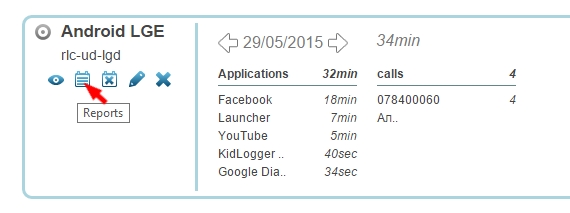
- התחברו ל-KidLogger.net ולחצו על סמל ה-Reports ליד שם המכשיר.
- בחלון שייפתח, בחרו את סוג הנתונים, כתובת המייל ושעת השליחה. סמנו את is Active ולחצו על Add Report.
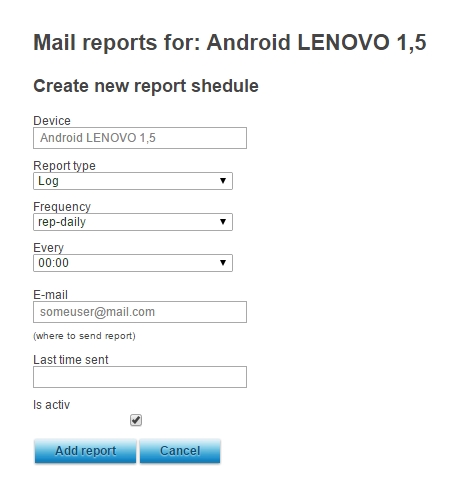
- ניתן להגדיר שעות, כתובות וסוגי מידע שונים עבור כל מכשיר בנפרד.
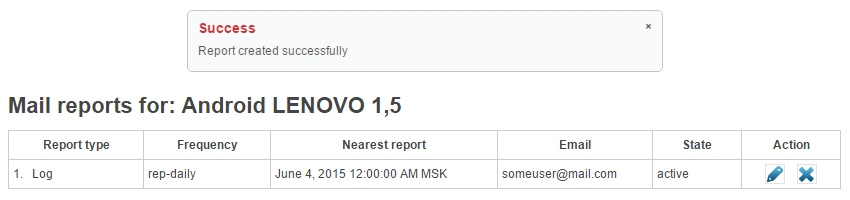
- בחלון הבא תוכלו לראות מתי נשלח הדוח האחרון, לערוך או למחוק הגדרות קיימות.