KidLogger.net hizmetine nasıl kayıt olurum?
Kayıt oldum. Bir sonraki adım nedir?
KidLogger.net üzerindeki etkinlik günlüklerini ve raporları nasıl incelerim?
Tek bir hesap kullanarak birden fazla cihaz nasıl izlenir?
E-posta raporları nasıl ayarlanır ve gönderilir?
Yüklenen verilerin yedek kopyası nasıl indirilir?
Abonelik ödemesi nasıl yapılır?
E-posta raporları nasıl gönderilir?
- Standard ve Professional hesap sahipleri, her cihaz için ayrı e-posta raporu alabilirler. Standard kullanıcılar günde 1, Professional kullanıcılar ise 5 rapora kadar gönderim yapabilir.
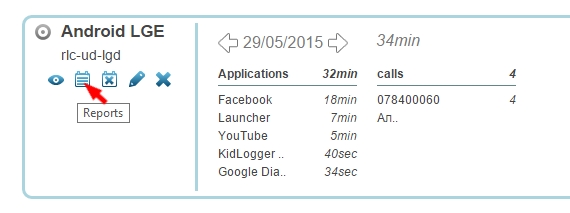
- KidLogger.net hesabınıza girin ve cihaz adının yanındaki Reports simgesine tıklayın.
- Açılan pencerede verileri, e-posta adresinizi ve gönderim saatini belirleyin. is Active seçeneğini işaretleyip Add Report butonuna tıklayın.
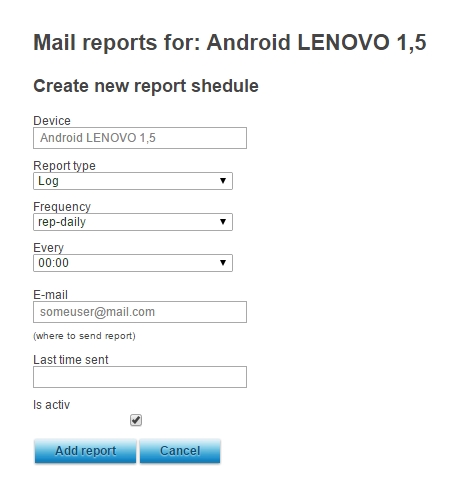
- Her cihaz için farklı saatlerde ve farklı adreslere gönderim ayarı yapabilirsiniz.
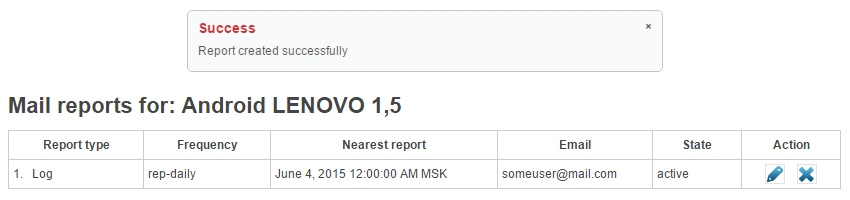
- Bir sonraki ekranda son gönderilen raporu görebilir, ayarları düzenleyebilir veya silebilirsiniz.