KidLogger PRO nos telefones POCO
26/09/2024Entre nossos clientes, não há muitos usuários de telefones POCO. Isso não acontece porque esses aparelhos são ruins; eles são bastante bons, mesmo que não sejam da categoria premium. Porém, esses telefones possuem algumas peculiaridades que dificultam a instalação de softwares de monitoramento. De um lado, algumas configurações estão em locais incomuns no Android; do outro, todos os aplicativos instalados usam um esquema adaptativo de economia de energia. Isso significa que o sistema Android pode desativar todos os apps em segundo plano se julgar que há pouca bateria ou memória, fazendo com que softwares de controle parental parem de funcionar corretamente.
Read the rest of this entry »Alterações na acessibilidade no Android 13
25/09/2024Você pode ter notado que no Android 13 e 14, o acesso à seção "Acessibilidade" foi alterado.
Após instalar o programa KidLogger PRO, você abre as Configurações, vai até Acessibilidade e percebe que o programa System Android está inativo.
Por que isso acontece?
Nova função – cópia de segurança
19/06/2023A criação de cópias de segurança foi modificada porque o tamanho dos dados carregados aumentou para 2 GB. Agora, ao criar uma cópia de segurança, o servidor pedirá que você aguarde um momento enquanto prepara o pacote. Durante esse tempo, será exibida a mensagem "Preparando para download", e quando o pacote estiver pronto, aparecerá o link Pronto para baixar.
Read the rest of this entry »Mensagens de voz e coordenadas – Novas funções de segurança no KidLogger PRO
18/11/2022O aplicativo KidLogger PRO para Android agora tem duas novas funções que ajudam seu filho a avisar os pais rapidamente sobre seu estado e localização:
- Envio de mensagem de voz
- Compartilhamento das coordenadas atuais
Read the rest of this entry »
Keylogger feature end of support
01/05/2022Microsoft continues its efforts to deliver the best cyber-security solution for Windows 10 and 11 by using cloud-based AI and machine learning. Here is a short guideline on how Microsoft identifies potentially unwanted applications (link) in an automated way. Key logging, invisible working mode, and hidden installation are one of the features that make software potentially dangerous and support malicious misuse of the application. KidLogger team will continue to respond to these changes and adapt features to continue the development of privacy-compliant Parental Control services.
Since the Covid-19 pandemic, computer surveillance solutions start being used more widely and thus require more regulation to preserve privacy and safety for computer workers, including children. KidLogger will support the software compliance initiatives offered by Microsoft to regulate computer monitoring solutions. Today, it is time to say goodbye to the “keylogger” feature. Since June 2022 some 'privacy' related features in KidLogger service will be discontinued and removed from the control panel and Windows application. In parallel, KidLogger will continue to integrate into the Windows Parental Control framework to offer the best solutions for digital parenting.
Read the rest of this entry »
More Parental Controls - Games, Smart TV and Smartphone
03/03/2022The presence of a parent in the life of a child is a necessary element in the upbringing and formation of personality. But the total control of the child can cause quite the opposite effect. Therefore, it is very important that parental control was loyal and manifests itself in the form of participation, interest, and support.
Read the rest of this entry »How to add screen time by the request of the child
02/03/2022As a parent, you have the right to limit the amount of time your child can use a computer. But we live in a world where life without computers, phones, tablets and other gadgets is already hard to imagine. Entertainment, games, creativity, education – all this has its analogues in the digital world. And it is not possible to completely prohibit a child's access to a computer or any other gadget. Therefore, as a parent, you need to learn how to control your child’s time in the digital environment, but not just be limited by the schedule, but be able to approach this issue as flexibly as possible.
Read the rest of this entry »Microsoft Family Safety: analog and additional tools
02/03/2022Using built-in applications to control a child's access to a computer or laptop has an undeniable advantage – you do not have to think about installation, payment, and even configuration. But what if such applications do not always work correctly?
Read the rest of this entry »KidLogger PRO 196 and 202
11/02/2022Two new versions of KidLogger PRO for Android were published in February.
The version 1.6.196(2.6.16) was published first as a stable release. The new features of the application are:
Read the rest of this entry »How to fix when Child request for more screen time no longer works in Microsoft Family
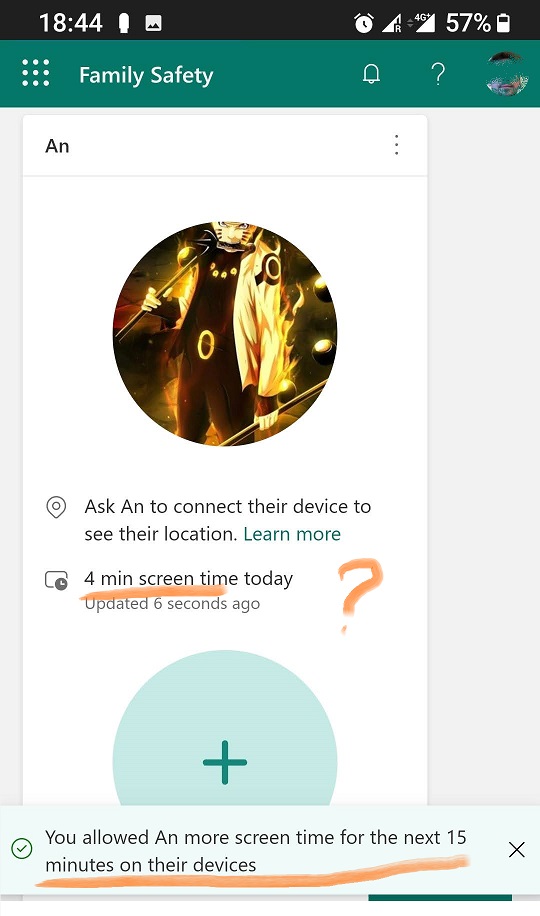
05/02/2022During the last year, Microsoft released so many security updates, that often Windows 10 or Windows 11 Update may disrupt or break Screen Time Control feature in Microsoft Family. So then some kind of glitches may occur, for example – it shows only 9 minutes of activity on Computer or the approval link for More screen time via email message will no longer work, etc. Here we show an example of a digital strategy you may use to back up yourself to avoid stress for both You and your Children.
Here is an example when you may see only 4 minutes of gameplay were counted despite the additional 15 minutes being approved after 2 hours of screen time.
Aqui você encontra tutoriais, artigos e anúncios sobre o KidLogger SAS: quais novos recursos implementamos, como instalar o KidLogger e como configurar o monitoramento de usuários para diferentes plataformas como Windows, Mac, Android.
Ficaremos felizes em ouvir quaisquer sugestões que você tenha para melhorar o KidLogger.
"Nunca deixe crianças e funcionários sem supervisão."
Archive
Últimas notícias
- 13 out
- 29 set
- 19 set
- 10 set
- 19 jul
- 25 jun
- 19 jun
- 13 jun
- 22 mai
- 10 fev