KidLogger PRO na telefonach POCO
26 wrz 2024Wśród naszych klientów nie ma wielu użytkowników telefonów POCO. Nie wynika to z tego, że te telefony są złe – są całkiem dobre, choć nie należą do najwyższej półki. Mają jednak pewne cechy, które utrudniają instalację programów kontrolnych. Z jednej strony niektóre ustawienia znajdują się w nietypowych miejscach dla systemu Android, a z drugiej wszystkie aplikacje korzystają z adaptacyjnego oszczędzania energii. Oznacza to, że system Android może wyłączyć wszystkie działające w tle aplikacje, jeśli uzna, że zasoby są niewystarczające, co powoduje błędy działania programów rodziców.
Read the rest of this entry »
Zmiany w dostępności w Androidzie 13
25 wrz 2024Można zauważyć, że w Androidzie 13 i 14 zmienił się sposób dostępu do sekcji Dostępność.
Po zainstalowaniu programu KidLogger PRO otwierasz Ustawienia, przechodzisz do Dostępności i widzisz, że program System Android jest nieaktywny.
Dlaczego tak się dzieje?
Nowa funkcja – kopia zapasowa
19 cze 2023Tworzenie kopii zapasowej zostało zmodyfikowane, ponieważ rozmiar przesłanych danych został zwiększony do 2 GB. Teraz przy tworzeniu kopii zapasowej serwer poprosi Cię o chwilowe oczekiwanie, aż przygotuje pakiet. Podczas tego procesu serwer wyświetla komunikat „Przygotowywanie do pobrania”, a gdy pakiet będzie gotowy, pojawi się odnośnik Gotowe do pobrania.
Read the rest of this entry »
Wiadomości głosowe i współrzędne – nowe funkcje bezpieczeństwa w KidLogger PRO
18 lis 2022Aplikacja KidLogger PRO dla systemu Android zawiera teraz dwie nowe funkcje bezpieczeństwa, które pomagają dziecku szybko powiadomić rodziców o swoim stanie i lokalizacji:
- Wysłanie wiadomości głosowej
- Udostępnienie bieżących współrzędnych
Read the rest of this entry »
Keylogger feature end of support
1 maj 2022Microsoft continues its efforts to deliver the best cyber-security solution for Windows 10 and 11 by using cloud-based AI and machine learning. Here is a short guideline on how Microsoft identifies potentially unwanted applications (link) in an automated way. Key logging, invisible working mode, and hidden installation are one of the features that make software potentially dangerous and support malicious misuse of the application. KidLogger team will continue to respond to these changes and adapt features to continue the development of privacy-compliant Parental Control services.
Since the Covid-19 pandemic, computer surveillance solutions start being used more widely and thus require more regulation to preserve privacy and safety for computer workers, including children. KidLogger will support the software compliance initiatives offered by Microsoft to regulate computer monitoring solutions. Today, it is time to say goodbye to the “keylogger” feature. Since June 2022 some 'privacy' related features in KidLogger service will be discontinued and removed from the control panel and Windows application. In parallel, KidLogger will continue to integrate into the Windows Parental Control framework to offer the best solutions for digital parenting.
Read the rest of this entry »
More Parental Controls - Games, Smart TV and Smartphone
3 mar 2022The presence of a parent in the life of a child is a necessary element in the upbringing and formation of personality. But the total control of the child can cause quite the opposite effect. Therefore, it is very important that parental control was loyal and manifests itself in the form of participation, interest, and support.
Read the rest of this entry »How to add screen time by the request of the child
2 mar 2022As a parent, you have the right to limit the amount of time your child can use a computer. But we live in a world where life without computers, phones, tablets and other gadgets is already hard to imagine. Entertainment, games, creativity, education – all this has its analogues in the digital world. And it is not possible to completely prohibit a child's access to a computer or any other gadget. Therefore, as a parent, you need to learn how to control your child’s time in the digital environment, but not just be limited by the schedule, but be able to approach this issue as flexibly as possible.
Read the rest of this entry »Microsoft Family Safety: analog and additional tools
2 mar 2022Using built-in applications to control a child's access to a computer or laptop has an undeniable advantage – you do not have to think about installation, payment, and even configuration. But what if such applications do not always work correctly?
Read the rest of this entry »KidLogger PRO 196 and 202
11 lut 2022Two new versions of KidLogger PRO for Android were published in February.
The version 1.6.196(2.6.16) was published first as a stable release. The new features of the application are:
Read the rest of this entry »How to fix when Child request for more screen time no longer works in Microsoft Family
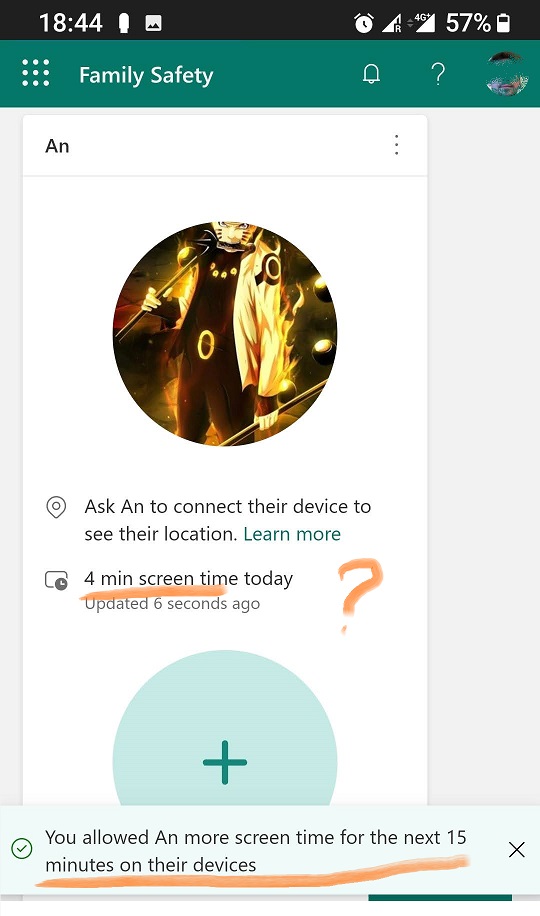
5 lut 2022During the last year, Microsoft released so many security updates, that often Windows 10 or Windows 11 Update may disrupt or break Screen Time Control feature in Microsoft Family. So then some kind of glitches may occur, for example – it shows only 9 minutes of activity on Computer or the approval link for More screen time via email message will no longer work, etc. Here we show an example of a digital strategy you may use to back up yourself to avoid stress for both You and your Children.
Here is an example when you may see only 4 minutes of gameplay were counted despite the additional 15 minutes being approved after 2 hours of screen time.
Tutaj znajdziesz samouczki, artykuły i ogłoszenia dotyczące KidLogger SAS: jakie nowe funkcje wdrożyliśmy, jak zainstalować KidLoggera oraz jak skonfigurować monitorowanie użytkowników na różnych platformach, takich jak Windows, Mac, Android.
Z chęcią wysłuchamy wszelkich sugestii dotyczących ulepszania KidLoggera.
„Nigdy nie zostawiaj dzieci i pracowników bez nadzoru.”
Archive
Najnowsze wiadomości
- 13 paź
- 29 wrz
- 19 wrz
- 10 wrz
- 19 lip
- 25 cze
- 19 cze
- 13 cze
- 22 maj
- 10 lut