Employee monitoring and time tracking with StaffCounter
24.3.2015We are proud to offer you our new service StaffCounter.net. It track employee’s time and screenshots.

StaffCounter allows you to monitor the quality of your employees’ work at the computer.
StaffCounter provides information on employees’ activities at their computers during working hours: time sheets and time-tracking, screenshots and web history.
How to monitor WhatsApp, Viber and Facebook messages.
24.2.2015Dear users of Android mobiles!
We have added an experimantal function in KidLogger PRO for Android to record the incoming and outgoing messages in Whatsapp, Skype and Viber.
To make it active, install the new version of Kidlogger PRO for Android from our site and install "Screen Text Capturer" apk.
Read the rest of this entry »Protect your privacy with encryption apps
30.5.2014Worried about privacy and data security?
Have a lot of confidential files on your computer/mobile and want to keep them in secret?
Then use serious encryption software. Here is the KidLogger data privacy tips and encryption software recommendations.
Read the rest of this entry »
Online parental responsibility
18.11.2013Thousands of parents are exposing their children to online risks by setting up social networking accounts for them, a charity has warned.
The National Children’s Bureau said that 45 per cent of parents with pre-teenage children have set up a Facebook account on their behalf, flouting the rules banning under-13s from using the site.
New keyboard for Android, BlackBerry update and more...
29.8.2013Dear users, last few month we were working hardly and now we could announce a few interesting things for you. Also the major success for us for these days is that KidLogger 1.5 for Android was allowed by Google for Play Market, it means it fully comply with Android OS application and content policy.
Whats new in a brief:
- Kidlogger.net engine update, Basic accounts now can hold 8 days of history. For parents it means that they need to verify the things in kidlogger just for a once a week.
New dashboard will be introduced soon - it allows to verify the entire productivity picture at a glance for just a few seconds. - KidLogger for Android updates. New Keyboard (SoftKeyboard PRO replacement) based on stock Android OS v.4.0 keyboard source code specially customized for kidlogger (PRO membership only) and more..
- KidLogger v.1.1 for BlackBerry OS was updated. Bug fixing release.
- KidLogger for Windows was updated.
- KidLogger v1.3. for Mac OS X was updated. Bug fixing release. DropBox support was removed due to DropBox API and UI policy changes.
Kidlogger's new success in Mac monitoring
3.6.2013We are glad to announce new version Kidlogger for Mac 1.3. We’re proud to say that the new edition offers new features . After turning on the computer or resumption of the session program digital web camera takes pictures of the user.
Monitoring application calculates inactive period for the switched-on Mac.
Calculates Internet activity time, detects search phrases typed while surfing in Safari, Mozila Firfox or any other browser. You can specify a list of words in print that the program will take screen shots of in app’s settings. Multiuser control – tracks all the users logged in, the log files are uploaded to your kidlogger’s account.

Now you will know for sure how much time your staff spent in any application launched on Mac. The children won’t lie you about few minutes spent in front of monitor. Any visited web sites, search phrases are caught by Kidlogger tool. Total time spent in Internet, it shows whether user communicates in social networks such as Facabook, Twitter or Google +, or he is watching videos online. You may control your employees online and your children’s activity the same easy as staying behind there Mac computers. Inside Kidlogger’s account overview accurate Analytics uploaded from the user’s devices. You can supervise devices remotely from any computer at any time. Nevertheless, Kidlogger works on the quite.
Possibilities and improvements for Mac:
- Tracks time spent in applications
- Records time while user surf the Internet
- Makes photos with camera after resume
- GPS tracking – detects notebooks location
- We have improved keystrokes logging
System requirements: Mac OS X 10.6 through Mac OS X 10.8.
Improvements, improvements and again improvements.
21.2.2013As the number of our users is growing, we are getting more and more inventive in trying to improve our service and programs.

Quite recently our cloudy service has become more sophisticated. We apologize to the customers for issues during Server upgrade process.
The users of Standard and Professional accounts can download the history Backup for each device.

In the nearest future we are planning to update the Dashboard by introducing some productivity items and something else. Such innovations have become possible through updating the Mac and Android platform versions. The applications will contain the same features with the only thing added – now you’ll have time parameters – time-estimating.
In your user account for each device the Kidlogger service will estimate the time spent in a certain application.
Your Dashboard will contain a list of necessary information making it possible for you to estimate the user’s activity with half an eye.
Read the rest of this entry »Total time for Web and Apps usage. Account updates and iOS support
17.10.2012Dear users and customers,
Recently we have finished updating KidLogger.net and now new features are available for all members. In brief, "Log View" now contains the total time the user spends while using a certain application or web site. Web Analytics now contains the Total time spent on each web site. Account features a bit changed and more.
This allows to measure productivity of for the Kid. Account features a bit changed and more.
With these features it is easy to find out the total time during which your Kid is using the web or office apps.
Kidlogger v 1.6 GPS tracking improvements
27.7.2012As from today we have added some improvements to Kidlogger for Android v 1.6.19. The main feature revised by developers was - GPS coordinates. Now you can follow the device location, GPS points on Map through Kidlogger account from anywhere.
Try this advanced feature. (available for Standard and Professional accounts)
Please note the following knowledgebase articles were updated within the last month:
- KidLogger for Android Best Practices list
Helps to tune up kidlogger for the target phone to ensure continuous monitoring process.
Find the facts about coordinates tracking with Kidlogger.
Read the rest of this entry »
New opportunities from Kidlogger server! Maps and keystrokes analytics.
19.7.2012Dear friends, we are happy to announce new features implemented in Kidlogger services.
Now in your Dashboard you will find
Keystrokes Analytics – our server collects and calculates the quantity of the typed keystrokes, time spent while typing and what applications the user types in most often.
Now you can have an idea about how much time your kid spends on web activities or chats with friends in such instant messengers as Skype, Yahoo or MSN Messenger. You’ll become aware of the things that attract him/her most and discover the reasons to encourage your child or limit his/her virtual life. With server Filter you can see the words your kid types to detect the abusive language used or home address typed.
We have also added Maps Analytics to our service. Now, you can entrust the phone to your kid and be kept notified about your kid’s whereabouts. Kidlogger application will track GPS coordinates and log all movements reflected on the Google Map. Step by step Kidlogger will be recording changes of your kid’s location that will make you sure whether your kid is at school or at the scheduled training.
on the Google Map. Step by step Kidlogger records changes of position that will make you sure whether your kid is at school or at the scheduled training. 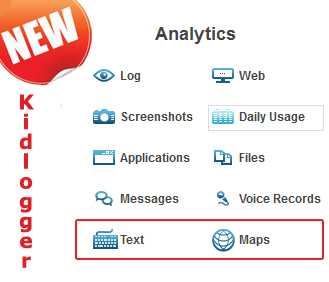
The benefits of Kidlogger server:
- You have your own account that you can use from any computer and any part of the World.
- The information is kept on Kidlogger server during thirty days.
- All the uploaded data from users' devices is processed and analyzed: screenshots, time tracking, keystrokes, coordinates, voice files, web history, Internet search, Skype chats, files and folders, applications used.
Read the rest of this entry »
Tu nájdete návody, články a oznámenia o KidLogger SAS: aké nové funkcie sme zaviedli, ako nainštalovať KidLogger a ako nastaviť monitorovanie používateľov pre rôzne platformy ako Windows, Mac, Android.
Radi si vypočujeme akékoľvek návrhy na zlepšenie KidLoggera.
„Nikdy nenechávajte deti a zamestnancov bez dozoru.“
Archive
Najnovšie správy
- 13 okt
- 29 sep
- 19 sep
- 10 sep
- 19 júl
- 25 jún
- 19 jún
- 13 jún
- 22 máj
- 10 feb