साइबरबुलिंग: ऐसी कहानियाँ जिन्हें नज़रअंदाज़ नहीं किया जा सकता
24-09-2025 हम अक्सर सोचते हैं कि स्क्रीन के पीछे की दुनिया सिर्फ़ मज़ा है — चैट, गेम, क्रिएटिविटी। लेकिन कई बच्चों और किशोरों के लिए ऑनलाइन जगह कुछ बहुत गंभीर भी छिपा सकती है: साइबरबुलिंग। नीचे आप पाएंगे वास्तविक मामले, साइबरबुलिंग क्या है इसका विवरण, इसे अपने बच्चे में कैसे पहचानें, और माता-पिता आज ही क्या व्यावहारिक कदम उठा सकते हैं।
वास्तविक कहानियाँ
Read the rest of this entry »KidLogger: निगरानी से सार्थक पारिवारिक जुड़ाव की ओर
11-06-2025हम KidLogger की अवधारणा को फिर से सोच रहे हैं। केवल गतिविधि पर नज़र रखने के बजाय, हम एक ऐसा उपकरण बना रहे हैं जो परिवारों के भीतर संवाद और देखभाल को मजबूत करता है।
वर्तमान में विकासाधीन: Parental Chat Assistant — यह केवल एक और मैसेंजर नहीं है, बल्कि परिवार के सदस्यों के बीच बातचीत के लिए एक निजी और सुरक्षित स्थान है।
यह कैसे अलग है:
Read the rest of this entry »अब KidLogger सर्वर हिंदी में उपलब्ध है!
05-06-2025 हिंदी दुनिया की सबसे अधिक बोली जाने वाली भाषाओं में से एक है, जिसे भारत और दक्षिण एशिया में 500 मिलियन से अधिक लोग बोलते हैं। हिंदी समर्थन जोड़ने से KidLogger उन लाखों माता-पिता और शिक्षकों के लिए अधिक सुलभ हो जाता है जो बच्चों की डिजिटल सुरक्षा को लेकर चिंतित हैं।
आप वेबसाइट और नियंत्रण पैनल को अपनी मातृभाषा में उपयोग कर सकते हैं। बस पृष्ठ के शीर्ष पर भाषा चयन मेनू से हिन्दी (Hindi) चुनें।
आपके विश्वास के लिए धन्यवाद!
KidLogger.net टीम
Read the rest of this entry »एंड्रॉइड के लिए KidLogger PRO का नया संस्करण जारी किया गया (एंड्रॉइड 14 और 15 का समर्थन करता है)
08-05-2025 हमें खुशी है कि हम Android के लिए अपडेटेड KidLogger PRO संस्करण जारी कर सकते हैं। यह संस्करण अब Android 14 और 15 का समर्थन करता है। पिछला संस्करण केवल Android 13 और उससे पुराने संस्करणों के साथ संगत था।
कृपया ध्यान दें: यह एक परीक्षण संस्करण है। कुछ निगरानी सुविधाएँ सही ढंग से काम नहीं कर सकती हैं, और कुछ स्मार्टफोन मॉडल के साथ संगतता समस्याएँ हो सकती हैं।
हम आपसे अनुरोध करते हैं कि अपने उपकरणों पर नया संस्करण स्थापित करें और कॉल और संदेश लॉगिंग, ऐप उपयोग ट्रैकिंग, स्थान निगरानी, स्क्रीनशॉट्स आदि सहित सभी निगरानी सुविधाओं का परीक्षण करें।
Read the rest of this entry »पेरेंटल चैट असिस्टेंट अब Play मार्केट में उपलब्ध है
01-03-2025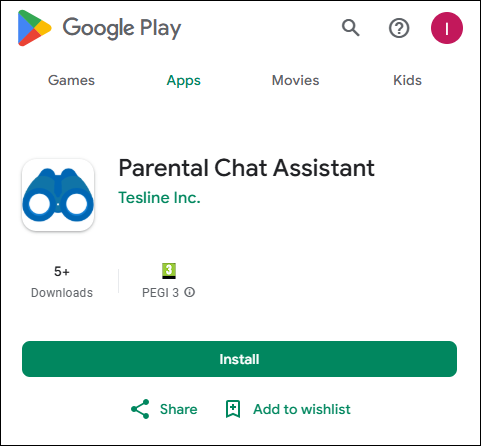 पेरेंटल चैट असिस्टेंट प्रोग्राम अब सभी उपयोगकर्ताओं के लिए Google Play मार्केट पर उपलब्ध है। आप अब इसे अपने डिवाइस पर इंस्टॉल कर सकते हैं और परिवार के भीतर सुविधाजनक और सुरक्षित संवाद के लिए इसका उपयोग शुरू कर सकते हैं।
नया क्या है?
- Play मार्केट के माध्यम से आसान इंस्टॉलेशन
- टेक्स्ट, आवाज, फोटो और वीडियो के साथ सुविधाजनक चैट
Ubuntu 22 के लिए KidLogger
08-01-2025Ubuntu 22 पर KidLogger एजेंट का नया संस्करण सफलतापूर्वक परीक्षण किया गया है।
लेकिन इसे काम करने के लिए, आपको Ubuntu 22.04 डेस्कटॉप में Wayland को अक्षम करना होगा।
Wayland एक संचार प्रोटोकॉल है जो एक प्रदर्शन सर्वर और उसके क्लाइंट्स के बीच संचार को निर्दिष्ट करता है। डिफ़ॉल्ट रूप से, Ubuntu 22.04 Jammy Jellyfish का GNOME डेस्कटॉप तो पहले से ही Wayland का उपयोग करता है, लेकिन Xorg प्रदर्शन सर्वर भी लोड किया जा सकता है।
How to Prevent the Removal of Kidlogger Agent by Antivirus Services in Windows
19-12-2024Antivirus software plays a crucial role in securing your computer, but sometimes it may mistakenly remove legitimate applications like the Kidlogger agent. Starting with the latest update, additional steps are required to ensure the agent functions correctly without interference. Follow this guide to configure your antivirus software properly and keep Kidlogger running smoothly.
Read the rest of this entry »Upcoming launch of new Parental Chat Assistant
16-12-2024 ध्यान दें! जल्द ही लॉन्च हो रहा है!
SafeJKA अपने अभिभावक नियंत्रण में नवोन्मेषी समाधानों के लिए जाना जाता है।
अब, हम अपने नवीनतम विकास को पेश करने का समय है — पेरेंटल चैट असिस्टेंट, एक क्रांतिकारी उपकरण माता-पिता और बच्चों के लिए, दोनों दृष्टिकोणों: बुजुर्ग और युवा के लिए।
पेरेंटल चैट असिस्टेंट के साथ, आप एक पारिवारिक सदस्य (माता-पिता, बच्चे या दादा-दादी) के रूप में संचार को प्रोत्साहित करने, फीडबैक कैप्चर करने और डिजिटल सहायक उपकरणों के माध्यम से वास्तविक दुनिया की जिज्ञासा को प्रेरित करने में सक्षम होंगे:
- आसानी से पहेलियाँ बनाना और असाइन करना।
- वास्तविक समय में प्रगति पर नज़र रखना।
- संदर्भ परिदृश्यों के लिए जनरेटिव Q/A मॉडलर तैयार करना, पहेलियों का प्रस्तावक।
- चर्चा पोर्टफोलियो कैटलॉग पर फोटो और वीडियो रिपोर्ट बनाना या देखना।
- परिवार के साथ स्वचालित चैट रेट्रोस्पेक्टिव, जिसमें फोटो, ऑडियो, स्थान डेटा शामिल हैं।
- AI-निर्देशित वर्चुअल देखभाल सहायक के साथ निरंतर रुचियों की खोज।
- वास्तविक देखभाल करने वालों की पहुंच।
Read the rest of this entry »
अपने देश में KidLogger के साथ "पेरेंटल कंट्रोल ऐज़ अ सर्विस"।
30-11-2024
क्या आप अपने देश में बच्चों की ऑनलाइन सुरक्षा के लिए एक विश्वसनीय समाधान प्रदान करने की सोच रहे हैं? KidLogger एक "पेरेंटल कंट्रोल ऐज़ अ सर्विस" उत्पाद पूर्ण व्हाइट-लेबल क्षमताओं के साथ प्रदान करता है।
इस अवसर को क्यों चुनें?
- पूर्ण संभावनाएँ: इंटरफ़ेस को पर्सनलाइज़ करें और क्षेत्र-विशेष सुविधाएँ जोड़ें।
- कानूनी अनुपालन: अपने देश के डेटा नियमों को पूरा करने के लिए स्थानीय रूप से सर्वर को होस्ट करें।
- नई राजस्व धारा: अपने ब्रांड के तहत पेरेंटल कंट्रोल व्यवसाय शुरू करें।
- प्रतिबंधों से बचें: बिना ब्लॉकों के सेवा उपलब्धता सुनिश्चित करें।
स्रोत कोड तक पहुंच प्राप्त करें और त्वरित एकीकरण के लिए पूर्ण समर्थन प्राप्त करें।
Read the rest of this entry »
Xiaomi, Redmi, Oppo और Poco पर KidLogger को स्थिर संचालन के लिए कैसे कॉन्फ़िगर करें
31-10-2024KidLogger Xiaomi, Redmi, Oppo और Poco पर काम क्यों नहीं कर रहा है?
हमारे उपयोगकर्ताओं ने लंबे समय से Xiaomi Redmi, Oppo और Poco फोन पर KidLogger प्रोग्राम के रुकने का नोटिस लिया है।
इसका कारण यह है कि बजट एंड्रॉइड फोन पर, MIUI बैकग्राउंड प्रोसेस को संसाधनों की बचत के लिए बंद कर देता है।
हाल ही में, हमने कुछ एप्लिकेशनों को बैकग्राउंड में पिन करने का एक तरीका पाया है ताकि सिस्टम उन्हें बंद न करे।
यहाँ आप KidLogger SAS के बारे में ट्यूटोरियल, लेख और घोषणाएँ पा सकते हैं: हमने कौन-कौन से नए फ़ीचर्स जोड़े हैं, KidLogger को कैसे इंस्टॉल करना है, और Windows, Mac, Android जैसे विभिन्न प्लेटफ़ॉर्म्स के लिए यूज़र मॉनिटरिंग कैसे सेटअप करनी है।
KidLogger को बेहतर बनाने के लिए आपके किसी भी सुझाव का हम स्वागत करते हैं।
"बच्चों और कर्मचारियों को कभी भी बिना निगरानी के न छोड़ें।"
Archive
नवीनतम समाचार
- 13 अक्टू
- 29 सितं
- 19 सितं
- 10 सितं
- 19 जुला
- 25 जून
- 19 जून
- 13 जून
- 22 मई
- 10 फ़र