Wie man das KidLogger PRO-Kontrollpanel auf einem Tablet ohne SIM-Modul startet
Sie müssen dazu das Android keyboard Modul installieren. Es handelt sich um eine Kopie der Standard-App Android Keyboard, jedoch mit der zusätzlichen Funktion zur Aufzeichnung von Tastenanschlägen. Mit KidLogger PRO für Android können Sie alle Tastenanschläge in allen Anwendungen aufzeichnen, einschließlich Passwörtern. Das Android keyboard Modul kann während der Konfiguration von KidLogger PRO oder später installiert werden.
So konfigurieren Sie es:
Installieren Sie Android Keyboard im Konfigurationsfenster von KidLogger PRO:
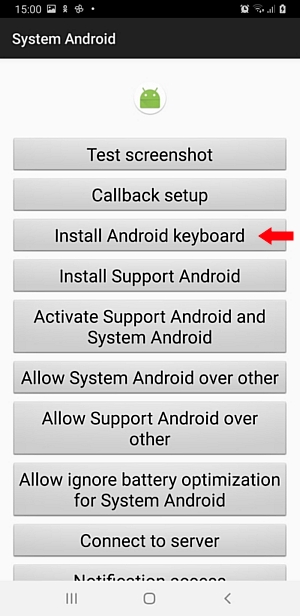
Oder laden Sie es von der Download-Seite von KidLogger PRO
herunter.
Um Tastenanschläge in allen Anwendungen, einschließlich Passwörtern, aufzuzeichnen:
Öffnen Sie die Telefoneinstellungen → Sprache und Eingabe → Tastaturliste, Android keyboard → EIN. Machen Sie es zur Standard-Tastaturanwendung. Klicken Sie auf das Symbol auf der rechten Seite des Fensters auf Höhe des Android keyboard. Fügen Sie die benötigten Sprachen hinzu.
So starten Sie das KidLogger PRO Kontrollpanel auf einem Tablet:Öffnen Sie die Telefoneinstellungen, Sprache und Eingabe → Tastaturliste, wählen Sie Android keyboard. Wählen Sie unten Erweiterte Einstellungen, geben Sie *123456# ein und klicken Sie auf Kontrollpanel starten.


Bekannte Probleme:
Wenn auf dem Telefon oder Tablet bereits die originale Android Keyboard des Herstellers installiert ist, kann unser Android keyboard nicht installiert werden.